Understanding Repeaters
Once you are comfortable sending and receiving messages on MeshCore, the next question is often “How can this network reach farther or become more reliable?” One of the most useful tools for improving coverage is a repeater.
What Is a Repeater?
A repeater is a MeshCore radio whose main job is to forward messages for other stations. Unlike a companion (the radio you carry or keep at home to send and receive your own messages), a repeater is usually placed in a fixed location and left running so it can help traffic travel beyond the range of individual users.
In simple terms:
- A companion is for you — it lets you join conversations and send messages.
- A repeater is for the network — it extends how far those messages can travel.
MeshCore separates these roles on purpose. Companions do not automatically rebroadcast every packet they hear. That keeps airtime lower and makes the network more efficient, but it also means the mesh depends on well-placed repeaters to cover larger areas.
When a Repeater Helps
A repeater is useful when there is a coverage gap between people who want to communicate. For example:
- Two companions can hear each other only sometimes, or not at all.
- A valley, building, or ridge is blocking the direct path.
- You want messages from a local area to reach a wider part of the network.
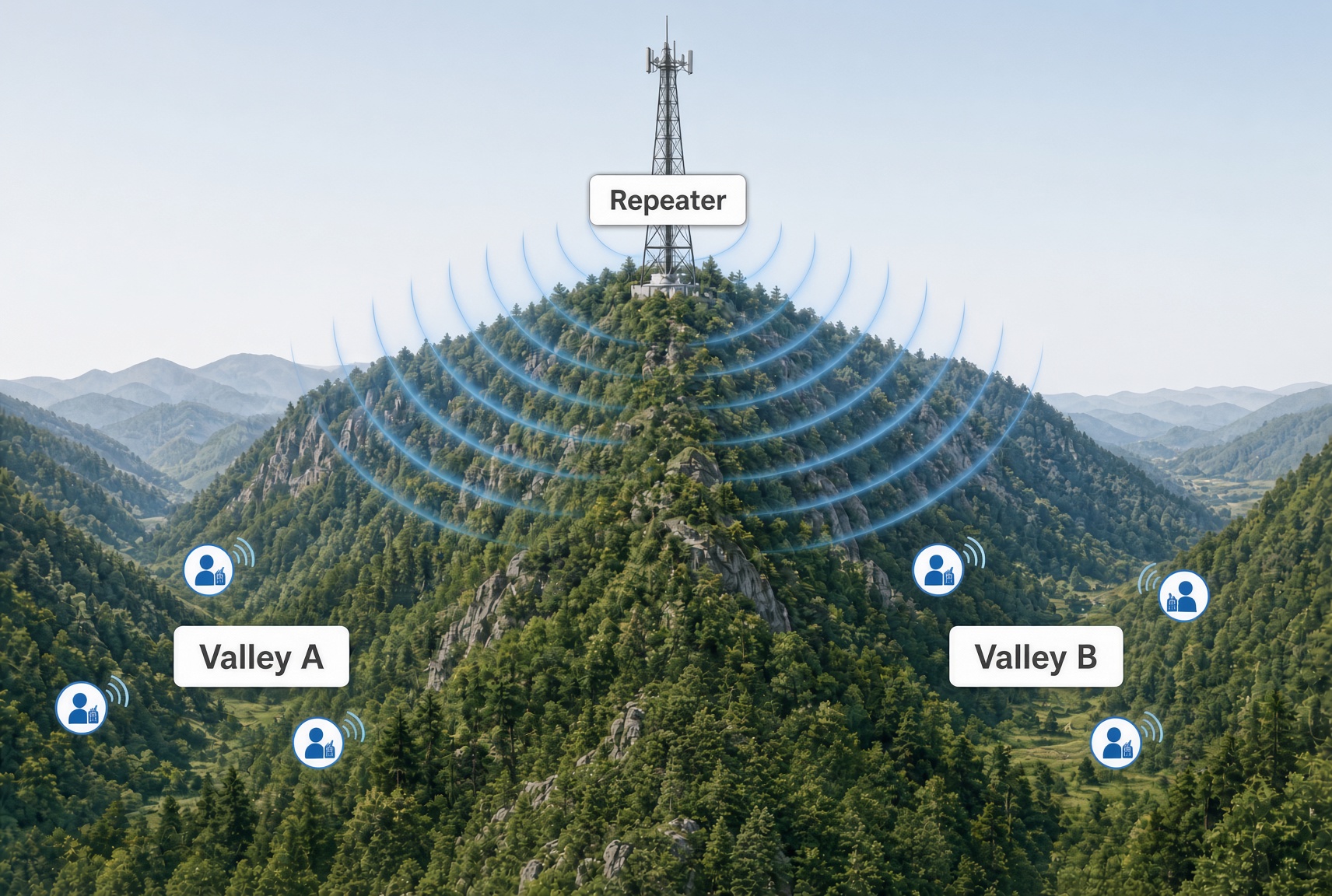
In these situations a single well-placed repeater can make a large difference. The illustration below shows one common case: users in two valleys can talk locally, but terrain blocks contact between the valleys until a repeater on the ridge provides coverage to both sides.
When More Repeaters Can Hurt
This is different from systems such as Meshtastic, where both companions and repeaters commonly rebroadcast. In MeshCore only designated repeaters forward traffic, and even they work best when they are well placed and not simply repeating every flood packet they hear. Adding more stations without regard to placement or configuration can increase airtime congestion rather than improve coverage.
A low-profile repeater that only covers a small local area can still cause problems if it rebroadcasts every flood packet it hears. Each rebroadcast occupies airtime on the shared channel. While that nearby station is transmitting, a better-placed repeater that could have reached a much larger area is unable to receive other traffic at the same time. Useful packets can be missed simply because local, low-value repeats are filling the channel.
The result is congestion and reduced reliability even though the extra repeater added little useful coverage. This is one reason well-placed, carefully configured repeaters are more valuable than simply adding more stations. Regions and region scopes (covered on the next page) give operators and users another tool to limit unnecessary flooding and reduce this kind of airtime contention.
Confirming a Repeater Is Helping
After a new repeater is online, a few practical checks help show whether it is improving the mesh:
- Messages that previously failed (or succeeded only unreliably) now succeed, and path traces show the new repeater in the route.
- Reasonable signal levels — The repeater hears the stations it is meant to serve, and those stations hear it, at levels that support consistent communication.
- Actual use — Over a few days the repeater appears in real message paths, not only in tests you generate yourself.
- No obvious new problems — Congestion does not noticeably increase, and existing working routes are not degraded.
When to Adjust or Remove
If testing shows the repeater is rarely used, only creates longer paths, or adds congestion without clear benefit, it is reasonable to:
- Try a different antenna location or height at the same site,
- Adjust region settings so it forwards less unnecessary traffic, or
- Take it offline and reconsider the location.
A repeater that does not improve the mesh can always be moved or reconfigured later. The objective is useful coverage and reliability, not simply a larger number of stations on the air.
Looking Ahead
Once a repeater is confirmed to be helping, ongoing attention shifts to monitoring, occasional tuning, and troubleshooting — topics covered in the Operating & Optimizing section. The sections on this page have focused on the decisions and first steps that get useful infrastructure in place.