For Most New Users: Start With a Companion
For most people, a companion radio is the simplest and most useful way to begin with MeshCore.
A companion is designed to work with the MeshCore app on your smartphone. The phone gives you a familiar interface for writing messages, viewing conversations, managing contacts, and changing settings. The companion supplies the LoRa radio that actually communicates with other MeshCore devices.
This division of jobs has an important advantage: the radio itself does not need a large screen, keyboard, or complicated controls. That allows companion devices to be small, portable, and relatively simple.
A companion also lets you experience the parts of MeshCore that matter most to a new user. You can exchange messages, join conversations, discover other devices, and begin seeing how a mesh network behaves in actual use.
You can always add other equipment later. A repeater, for example, can improve coverage and help build network infrastructure—but you do not need to operate a repeater simply to participate in MeshCore.
For most beginners, one compatible companion radio and a smartphone are enough to get started.
Two Common Companion Styles
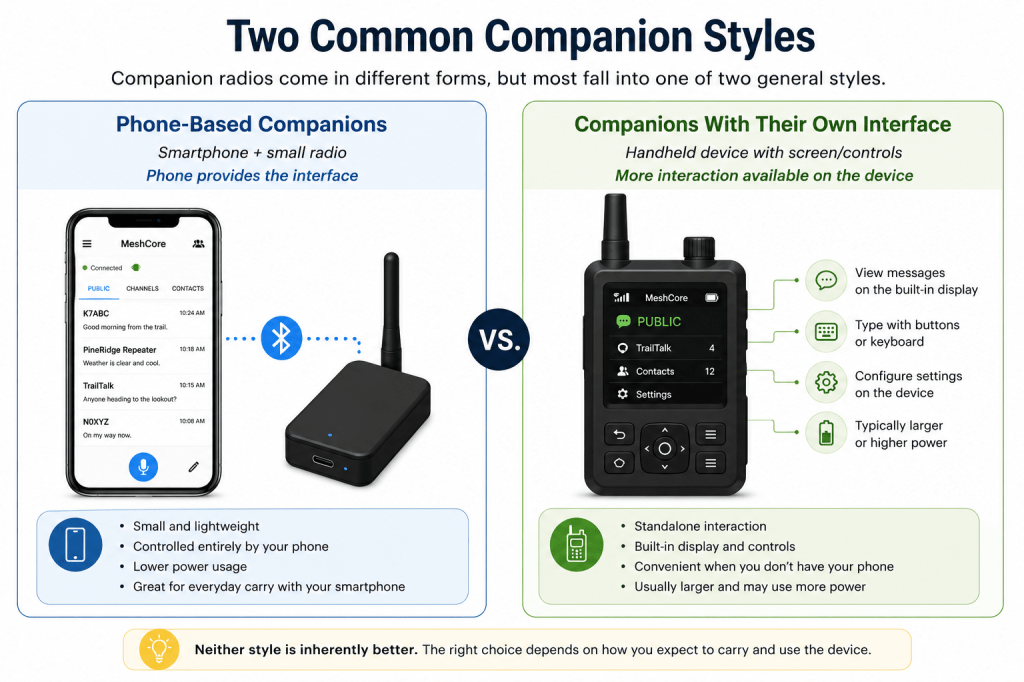
Companion radios come in different forms, but most fall into one of two general styles.
Phone-Based Companions
A phone-based companion is usually a small radio with few, if any, controls of its own. It connects to your smartphone, and you use the MeshCore app for messaging, contacts, channels, and configuration.
This style is a good choice when you already carry a smartphone and want the MeshCore radio to remain small and simple. Depending on the device, it may have an internal battery or use an external power source.
Companions With Their Own Interface
Some MeshCore devices include a display, keyboard, buttons, or other controls that allow more interaction directly with the radio.
These devices can be convenient when you want a more self-contained setup or prefer not to rely on your phone for every interaction. The tradeoff is usually a larger device, greater power requirements, or additional complexity compared with a simple phone-based companion.
Neither style is inherently better. The right choice depends on how you expect to carry and use the device.
If you normally have your smartphone with you, a simple phone-based companion is often the easiest place to start. If you want more capability directly on the device, a companion with its own interface may be a better fit.
What Matters When Choosing Hardware
Once you have decided what style of companion fits the way you want to use MeshCore, there are several practical details to consider before choosing a device.
Frequency and Region
LoRa devices are manufactured for different frequency bands, and the correct band depends on where the radio will be used. Make sure the device you choose supports the frequency used by MeshCore in your region.
This is especially important when buying hardware online. Devices that look identical may be offered in different frequency versions.
MeshCore Compatibility
Not every LoRa-capable device can necessarily run MeshCore. Before purchasing hardware, confirm that MeshCore firmware is available for the specific device or board you are considering.
Choosing supported hardware also makes installation and future firmware updates considerably easier.
Connecting to Your Phone
For a typical phone-based companion, Bluetooth provides the connection between the radio and the MeshCore app. This allows the companion to remain in a pocket, backpack, vehicle, or other convenient location while you interact with MeshCore from your phone.
Some devices also provide USB or other connection options. These can be useful for particular applications, but Bluetooth is generally the most convenient choice for a portable companion used with a smartphone.
Power and Battery
Consider how the device will be powered and charged. Some companions include an internal rechargeable battery, while others require a battery to be added or rely on an external power source.
For portable use, battery capacity affects how long the companion can operate between charges. Also consider the charging connection and whether it fits conveniently with the equipment you already carry.
Antenna
The antenna is an important part of any radio system. Some devices have a built-in antenna, while others provide a connector for an external antenna.
A built-in antenna can make a companion compact and convenient. An external antenna connection provides more flexibility and can allow the radio to be used with an antenna better suited to a vehicle, fixed location, or other application.
Don’t judge a MeshCore device by transmitter power alone. Antenna performance, terrain, radio placement, receiver performance, and the surrounding mesh can all have a significant effect on communication.
Size and Portability
Think about where the companion will actually be used. A small device may be ideal for carrying in a pocket or backpack, while a larger device may provide a bigger battery, display, keyboard, or additional controls.
The best choice is not necessarily the smallest or the most feature-rich device. It is the one that fits how you intend to use it.
Display and Controls
Finally, decide how much interaction you want directly on the radio.
If you are comfortable using your smartphone as the primary interface, a companion without a display may be all you need. If you want to view information or perform some functions without reaching for your phone, a device with its own display and controls may be worth the additional size and complexity.
For a first MeshCore companion, prioritize compatibility, the correct frequency, a practical power source, and a form factor that fits how you will actually use the radio. Additional features can be useful, but they are not necessary simply to get started.
What You Probably Don’t Need Yet
MeshCore can support much more than a single companion radio. As you explore the network, you will encounter repeaters, Room Servers, sensors, higher-power radios, external antennas, solar-powered installations, and other specialized equipment.
Those devices can be important parts of a MeshCore network, but you do not need them simply to get started.
Repeaters
A repeater is network infrastructure. Its purpose is to help MeshCore packets travel beyond the range of individual users by forwarding traffic through the mesh.
Operating a useful repeater involves more than purchasing another radio. Location, elevation, antenna placement, power, coverage, and the surrounding network all influence how useful that repeater will be.
There is plenty of time to explore repeaters after you understand how MeshCore works from the user’s side.
Room Servers
Room Servers provide persistent shared spaces where messages can be stored and retrieved by users. They serve a different purpose from a personal companion and are normally something you encounter as part of a MeshCore network rather than something you need for your first station.
Sensors and Specialized Devices
MeshCore can also support devices intended for telemetry, sensing, monitoring, or other specialized applications. These can expand what a network can do, but they are not necessary for basic person-to-person communication.
Start Simple
It can be tempting to build an entire MeshCore system before you have used the network. A better approach is to begin with a companion, learn how messaging and network behavior work, and then add equipment when you have a reason for it.
Your first device does not need to build the network. It only needs to get you onto it.
A Sensible First Setup
Getting started with MeshCore does not require a complicated collection of equipment. For most new users, a practical first station consists of only a few things.
A Compatible Companion Radio
Choose a companion that supports MeshCore, operates on the correct frequency for your region, and fits the way you expect to use it.
For many people, a small Bluetooth companion is an excellent first choice. A more self-contained device may make sense if you specifically want a display, keyboard, or controls on the radio itself.
Your Smartphone
For a phone-based companion, your smartphone provides the interface you will use for MeshCore. The MeshCore app handles conversations, contacts, channels, and configuration while the companion handles the radio communication.
You do not need a dedicated phone. The smartphone you already carry can normally serve this role.
An Appropriate Antenna
Your companion needs an antenna designed for the frequency band on which it operates.
If the device includes an antenna, that may be all you need initially. If the antenna is removable, you can explore other antenna options later as you gain experience and better understand where and how you use the radio.
Always connect an appropriate antenna before transmitting with a radio that requires an external antenna.
A Practical Way to Power It
Depending on the companion, this may be an internal rechargeable battery, an added battery, or an external USB power source.
For your first setup, convenience is usually more important than building the largest possible power system. You want enough operating time for normal use and an easy way to recharge the device.
Keep the First Station Simple
Your first MeshCore station does not need to be your final one.
Start with equipment that lets you communicate reliably and learn how MeshCore works. Once you have used the network, you will have a much better idea whether you need a different antenna, more battery capacity, another type of companion, or eventually infrastructure of your own.
A companion, a suitable antenna, power, and the phone you already carry may be everything you need to begin exploring MeshCore.
Where We Go From Here
You now have a better idea of what a first MeshCore device needs to do and which features are worth considering.
For most new users, the goal is straightforward: choose a compatible companion for the correct frequency, give it an appropriate antenna and power source, and use it with the smartphone you already carry.
You do not need to understand every type of MeshCore hardware before getting started. Experience with a simple companion will make later decisions about antennas, additional radios, repeaters, and other network equipment much easier to understand.
The next step is to get MeshCore running on your chosen hardware.
Next: Installing and Configuring MeshCore
Continue to: Installiing and Connecting MeshCore →

