You have now configured your Companion, learned how Contacts and Channels are used, and seen how MeshCore can communicate directly or through other devices in the mesh.
Now it is time to use that knowledge to begin communicating.
MeshCore provides two basic ways to begin a conversation. You can send a message on a Channel, where other users of that channel may receive it, or you can send a Direct Message addressed to one particular Contact.
These two types of communication may look similar when you type and send a message, but they serve different purposes.
Channel message — a conversation shared through a channel.
Direct Message — a message addressed to one particular MeshCore station.
In this lesson, we will send both types, see how replies appear in the app, and learn how to tell whether a Direct Message was delivered.
Sending a Message on a Channel
A Channel provides a shared place for MeshCore users to exchange messages.
When you send a message to a Channel, you are not addressing one particular Contact. Instead, the message is sent using that Channel so that other MeshCore users configured for the same Channel can receive it.
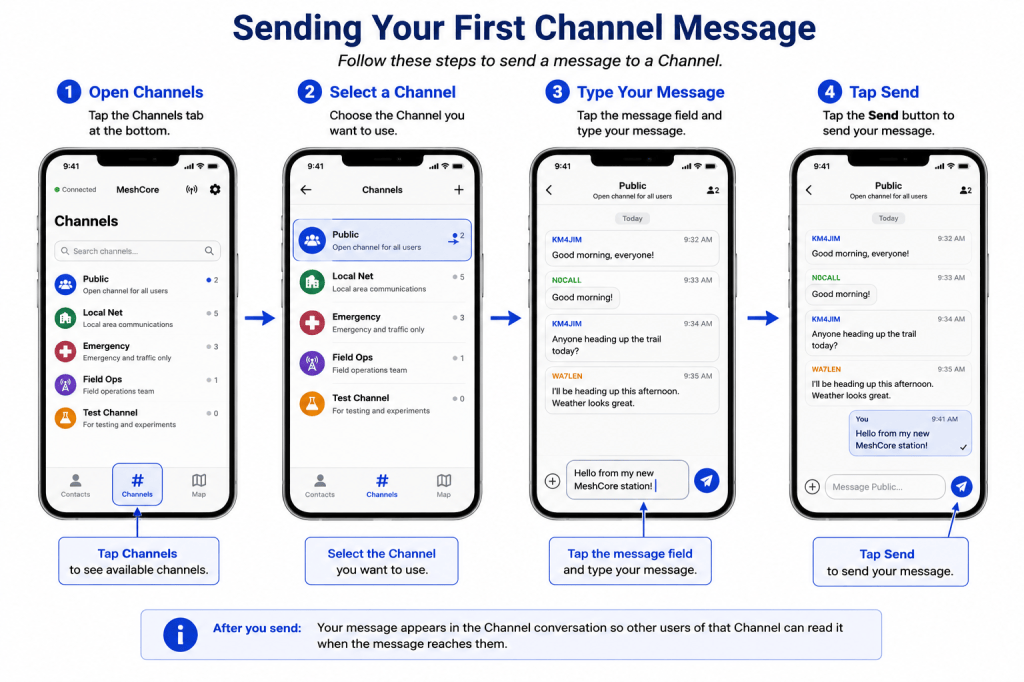
To send your first Channel message:
- Open the Channels section of the MeshCore app.
- Select the Channel you want to use.
- Tap the message field at the bottom of the screen.
- Type a short message, such as Hello from my new MeshCore station!
- Tap the Send button.
After sending the message, it should appear in the Channel conversation.
Who Will Receive Your Message?
Sending a Channel message does not mean that every MeshCore station everywhere will receive it.
The receiving station must be configured to use the same Channel, and the message must also be able to reach that station through the radio network.
Depending on the Channel and network configuration, the message may be heard directly by nearby stations or carried farther through repeaters.
For now, the important point is simple: selecting a Channel determines where you are having the conversation; the mesh determines how that message can travel.
Receiving and Replying to a Channel Message
When another user sends a message on a Channel you are using, that message can appear in the Channel conversation along with the other messages received there.
The sender’s name is shown with the message so you can see who transmitted it.
To reply, you do not need to create a new conversation. Simply open the same Channel, type your response in the message field, and tap Send.
Your reply becomes another message in that Channel conversation and may be received by other users of the Channel who can be reached through the mesh.
A Channel Is a Shared Conversation
This is an important difference between a Channel and a Direct Message.
When you reply on a Channel, your response is being sent to the Channel—not privately to the person whose message you are answering.
Other users receiving that Channel may therefore see both the original message and your reply.
If you want to communicate privately with one particular station, use a Direct Message instead.
Think of a Channel as a shared radio conversation and a Direct Message as a conversation addressed to one particular station.
Sending a Direct Message
A Direct Message is used when you want to communicate with one particular MeshCore station rather than everyone using a Channel.
Instead of selecting a Channel, you begin by selecting the Contact you want to reach.
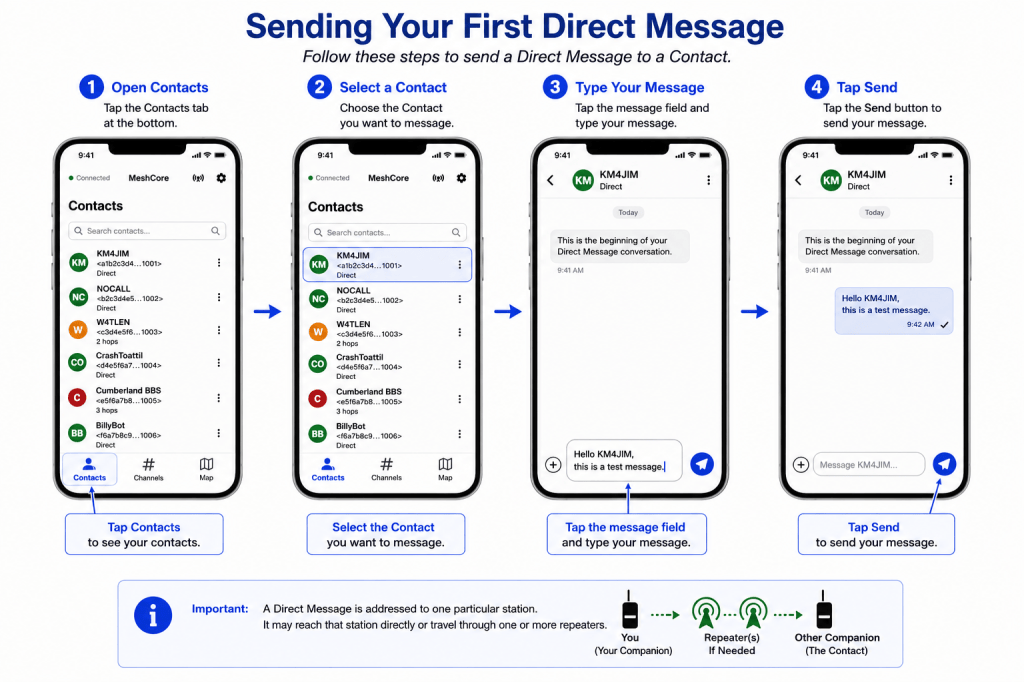
To send a Direct Message:
- Open the Contacts section of the MeshCore app.
- Select the Contact you want to message.
- Tap the message field at the bottom of the conversation.
- Type your message.
- Tap Send.
MeshCore will attempt to deliver the message to that particular station using the path currently available to reach it.
The other station does not necessarily need to be within direct radio range. As you learned in the previous lesson, the message may travel through one or more repeaters before reaching its destination.
A Direct Message is addressed to one particular station, even when repeaters are needed to carry it there.
Direct Does Not Mean Direct Radio Range
This distinction is worth remembering.
The term Direct Message describes who the message is addressed to, not whether the two radios can hear each other directly.
A Direct Message might travel:
Your Companion → Other Companion
or
Your Companion → Repeater A → Repeater B → Other Companion
In both cases, it is still a Direct Message because it is addressed to one particular station.
What If You Do Not See “Delivered”?
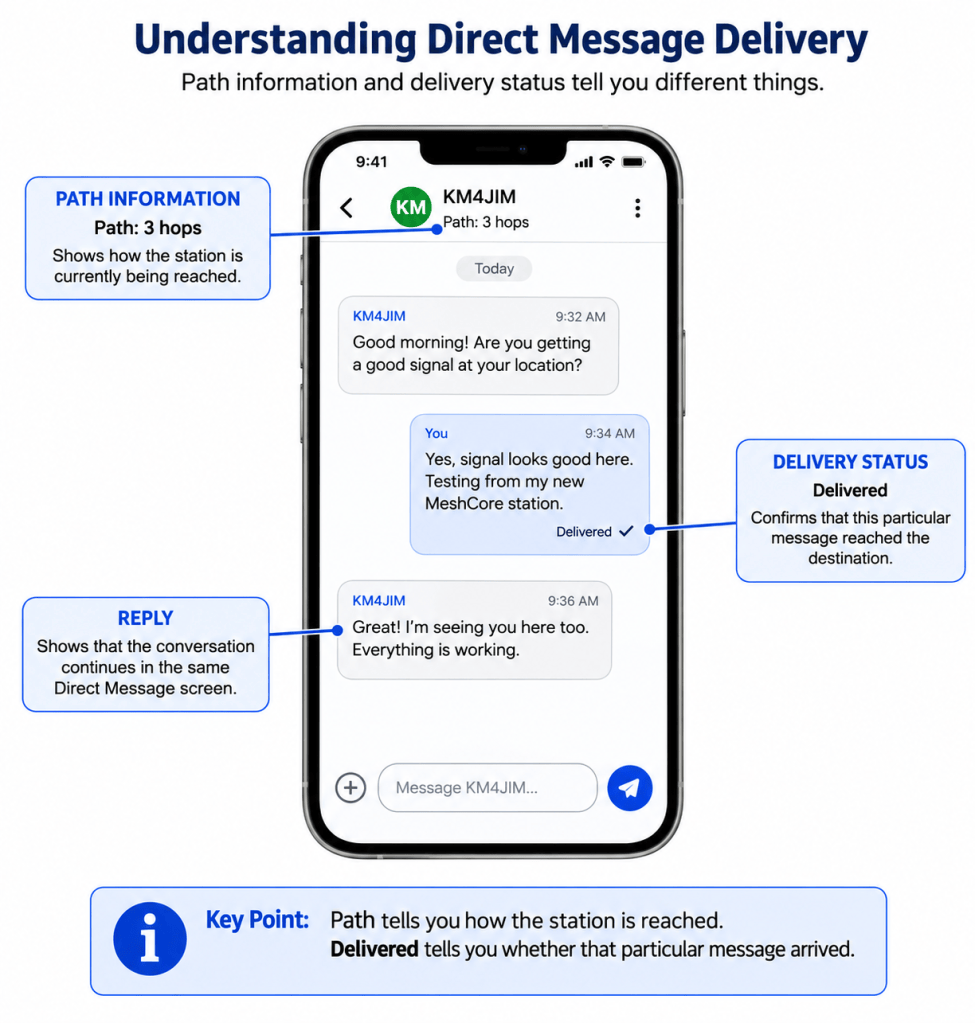
Not every Direct Message will immediately show a Delivered indication.
If delivery has not been confirmed, it does not necessarily mean that anything is wrong with your Companion. Radio conditions can change, a repeater in the path may be temporarily unavailable, or the destination station itself may not currently be reachable.
The important distinction is that sending a message and confirming its delivery are two different events.
Your Companion can transmit a Direct Message, but the message is not confirmed as delivered until the appropriate confirmation is received from the destination.
For a new MeshCore user, there is usually no need to troubleshoot immediately if a message is not confirmed.
Wait a short time and try again. As you become more familiar with MeshCore, the path and other network information available in the app can help you understand why a particular station may be difficult to reach.
No delivery confirmation does not automatically mean your radio has failed. It means successful delivery of that message has not been confirmed.
Receiving a Reply
When the other station responds, its message appears in the same Direct Message conversation.
You can continue the conversation by typing another message and tapping Send, much as you would with a conventional messaging application.
Behind that simple conversation, however, MeshCore is using the radio network to move each message between the two stations. The path used for a later message may not necessarily be identical to the path used for an earlier one.
For now, you only need to remember three things:
- A Direct Message is addressed to one particular station.
- Path or hop information describes how that station can be reached.
- Delivered confirms that a particular message was received by its destination
A Good First Test
When learning to use MeshCore, it is helpful to exchange a few Direct Messages with another station that you know is active.
Send a short message and watch for the Delivered indication. Then have the other operator reply.
If both messages are exchanged successfully, you have completed one of the most important first steps in using MeshCore: communicating with another station through the mesh.
What You Have Learned
You have now used the two basic forms of communication in MeshCore: Channel messages and Direct Messages.
A Channel message is part of a shared conversation. Other MeshCore users configured for that Channel may receive the message when the mesh can carry it to them.
A Direct Message is addressed to one particular MeshCore station. It may travel directly to that station or through one or more repeaters.
You have also learned that:
- Contacts identify individual MeshCore stations you can communicate with.
- Channels provide shared conversations for groups of users.
- Path or hop information describes how another station can be reached through the mesh.
- Delivered confirms that a particular Direct Message reached its destination.
- A reply to a Channel message remains part of the shared Channel conversation.
- A reply to a Direct Message remains part of the conversation with that particular Contact.
Most importantly, you have moved beyond simply configuring your Companion. You can now use it to communicate with other MeshCore users.
Before Moving On
Spend a little time sending and receiving messages.
Try a Channel conversation. Send a Direct Message to another active station. Watch the path information and delivery status as you communicate.
You may notice that some stations are reached directly while others require one or more repeaters. You may also notice that paths change over time.
Those observations are your first glimpse of MeshCore operating as a real mesh network.
Next Lesson
Now that you can communicate through MeshCore, the next step is learning more about what your Companion is showing you as it interacts with the network.
In the next lesson, we will build on what you have already learned and examine the information MeshCore provides about the stations and activity around you.
Continue to: Next Lesson in this series→

