Now that you have exchanged messages through MeshCore, you can begin to make sense of the information appearing around those conversations.
As your Companion listens to the mesh, it learns about other MeshCore stations and the ways some of those stations can be reached. The MeshCore app gives you a way to see and use that information.
At first, the changing Contacts, paths, hop counts, and other information displayed by the app can make the network seem complicated.
It becomes much easier to understand once you remember one important idea:
The MeshCore app is showing you what your Companion currently knows about the mesh.
It is not showing a fixed directory of every MeshCore station everywhere. What your Companion knows can change as it hears other stations, receives new information, and learns different ways of reaching them.
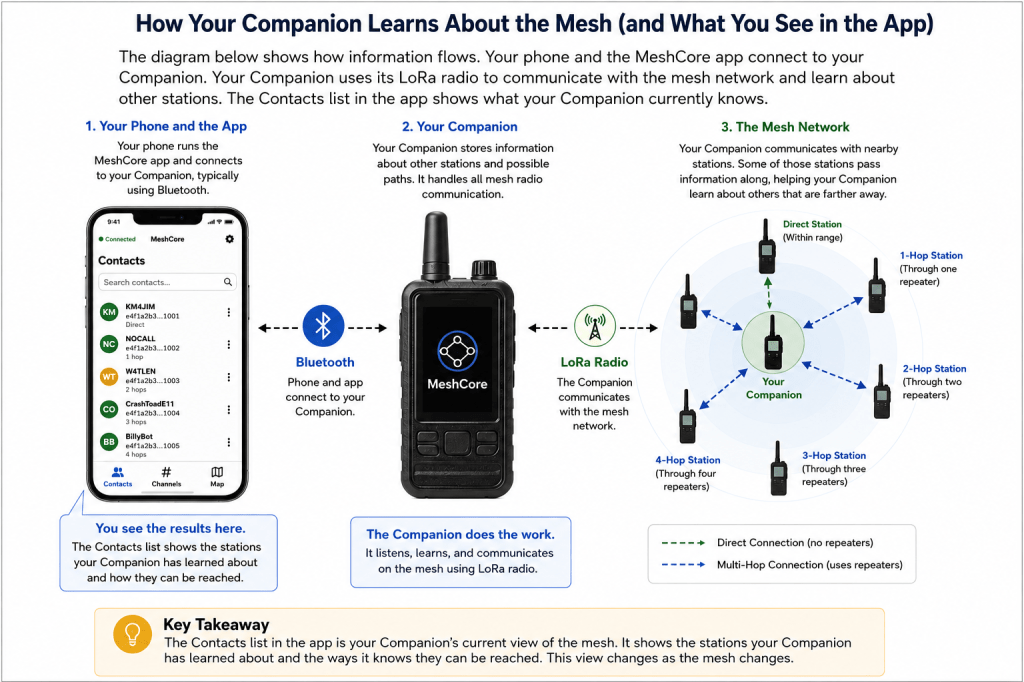
Your Phone and Your Companion Have Different Jobs
When you use MeshCore from your phone, two different wireless connections may be involved.
Your phone communicates with your Companion, typically using Bluetooth.
Your Companion communicates with other MeshCore devices using its LoRa radio.
That distinction is important.
When a distant station appears in the MeshCore app, your phone has not necessarily heard that station directly. Your Companion has learned about the station through the MeshCore radio network, and the app is displaying that information to you.
What the Contacts List Represents
As your Companion receives information from the mesh, other MeshCore stations may appear in the Contacts section of the app.
A Contact represents another MeshCore station that your Companion has learned about.
Some Contacts may be stations your Companion can hear directly. Others may be stations that can be reached through one or more repeaters.
This is why the Contacts list can contain stations much farther away than the direct radio range of your Companion.
A station appearing in Contacts does not necessarily mean your Companion can hear that station directly.
It means your Companion has information about that station and may know a way to communicate with it through the mesh.
Contacts Can Change Over Time
The Contacts list is not static. As your Companion continues listening to the mesh, the information it has about other stations can change.
Your Companion may learn about new stations, receive updated information about stations it already knows, or learn a different way of reaching them.
For example, a station previously shown several hops away might later be reached through a shorter path. A station that was recently available may also become more difficult to reach if radio conditions change or part of its previous path is no longer available.
These changes are normal in a mesh network.
Think of the Contacts list as your Companion’s current view of the stations it has learned about—not as a permanent directory of every station on the network.
What Hop Counts Tell You
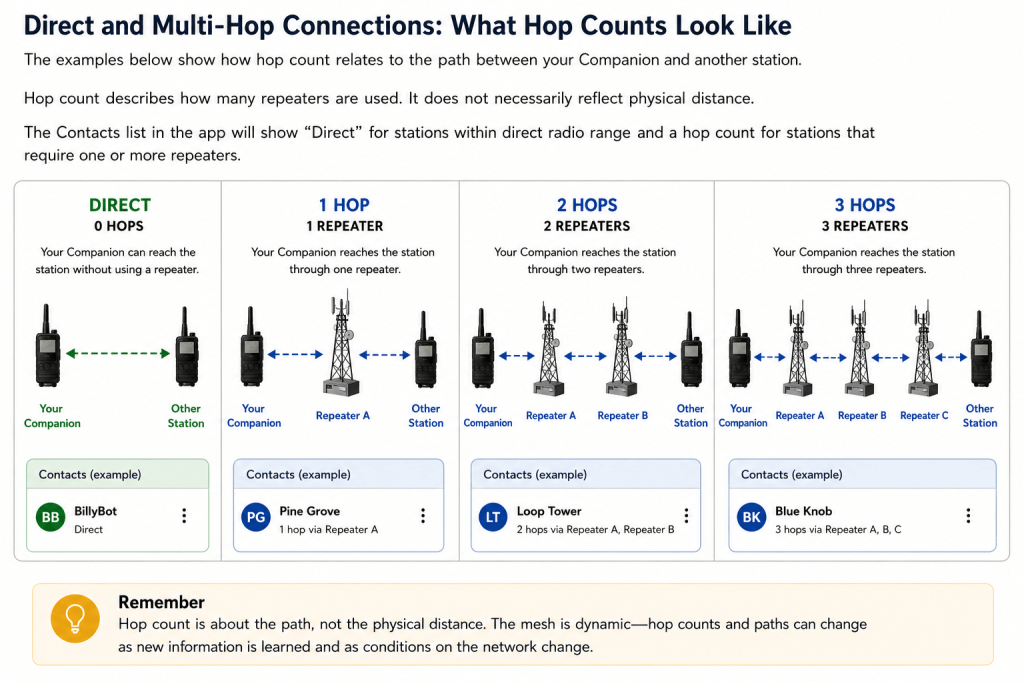
As your Companion learns about other stations, you may see a hop count associated with some Contacts.
The hop count gives you an indication of how many repeaters are involved in the known path between your Companion and another station.
A station shown as Direct can be reached without using a repeater.
A station shown as 1 hop is reached through one repeater. A station shown as 2 hops is reached through two repeaters, and so on.
For example:
Your Companion → Other Station
Direct
Your Companion → Repeater A → Other Station
1 hop
Your Companion → Repeater A → Repeater B → Other Station
2 hops
The important thing to remember is that hop count describes the path, not physical distance.
A station many miles away might be reached through only one well-positioned repeater, while a geographically closer station might require several hops because of terrain, buildings, antenna locations, or other radio conditions.
A Hop Count Can Change
The hop count shown for a Contact should not be thought of as a permanent property of that station.
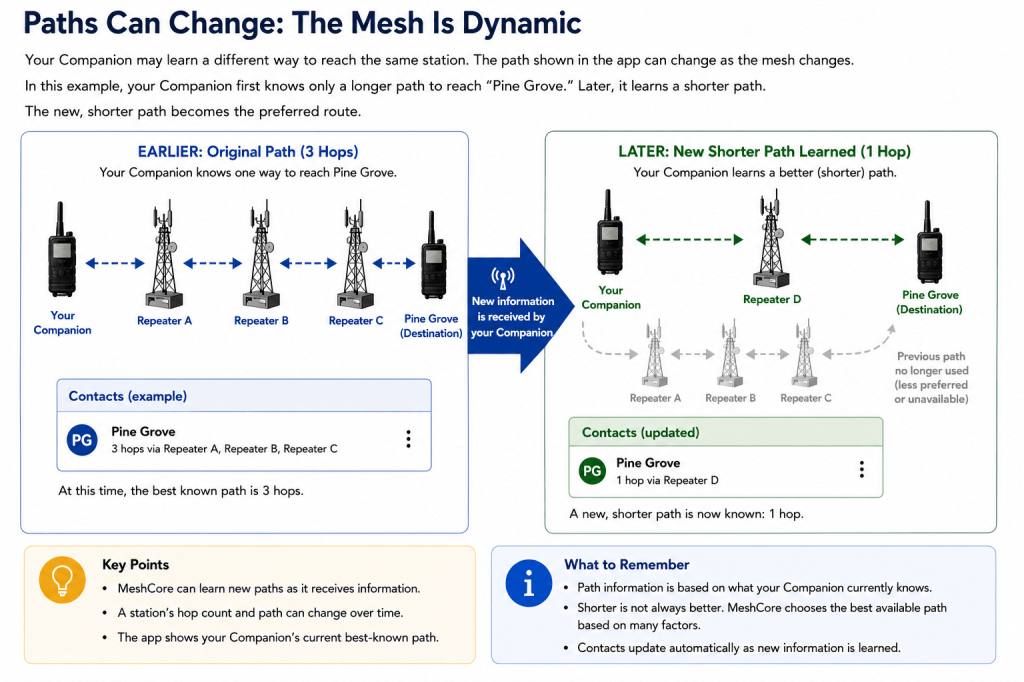
MeshCore can learn new paths as information moves through the network. A station that previously appeared as three hops away might later appear as two hops away—or even Direct—if a different path becomes available.
Likewise, a previously short path may disappear when a repeater becomes unavailable or radio conditions change.
A changing hop count is usually an indication that your Companion’s knowledge of the mesh is changing, not that something is wrong.
What Path Information Tells You
For some Contacts, MeshCore can provide more information than simply the number of hops. You may also be able to see path information describing the route used or known for reaching that station.
A path can include one or more repeaters between your Companion and the destination.
Conceptually, a path might look like:
Your Companion → Repeater A → Repeater B → Destination
This information helps explain something you have already seen in this series: two stations do not necessarily need to hear each other directly in order to communicate.
The repeaters between them can extend communication across the mesh.
It is also important not to interpret a displayed path as a guarantee that the same route will work indefinitely. The mesh is dynamic, and the information your Companion has about a station can change.
Think of path and hop information as your Companion’s current understanding of how another station can be reached.
What You Are Beginning to See
At this point, the Contacts screen should start to make more sense.
It is not simply an address book.
It is showing you part of your Companion’s evolving knowledge of the MeshCore network: the stations it has learned about, whether some can be reached directly, and the paths it knows for reaching others.
As you leave your Companion operating, you may see new Contacts appear, hop counts change, and different paths become available.
Those changes are one of the first visible signs that MeshCore is continuously learning about the network around it.
Understanding Paths
A path describes the route your Companion currently knows for reaching another MeshCore station.
If the other station can be reached directly, no repeater is required. When the station is farther away, the path may pass through one or more repeaters before reaching the destination.
For example:
Your Companion → Other Companion
is a direct connection.
A longer path might look like:
Your Companion → Repeater A → Repeater B → Other Companion
In this example, the destination is 2 hops away because two repeaters are used along the path.
Paths Can Change
The path shown for a Contact should not be thought of as a permanent route.
MeshCore is a dynamic radio network. As your Companion receives new information, it may learn a different way to reach the same station. A shorter path may become available, or a previously known path may no longer be usable.
This is why the path or hop count displayed for a Contact can change even though neither you nor the other operator changed any settings.
A Path Is Not a Delivery Confirmation
There is an important distinction between knowing a path and successfully delivering a message.
A displayed path means your Companion has information about how the destination can be reached through the mesh. It does not mean that every message sent using that path will necessarily arrive.
Radio conditions can change, a repeater in the path may become unavailable, or the destination itself may no longer be reachable.
Think of the displayed path as your Companion’s current knowledge of how to reach another station—not as a permanent or guaranteed connection.
What Does “Direct” Mean?
This is the right point to clarify that Direct in the Contacts list can be misunderstood. We should distinguish the communication concept from ordinary assumptions about physical proximity, while being careful not to introduce the deeper routing material too early.
Text to post
What Does “Direct” Mean?
As you look through the Contacts list, you may see some stations identified as Direct while others show a hop count or path information.
A station shown as Direct can be reached without using another MeshCore repeater between your Companion and that station.
In its simplest form:
Your Companion → Other Station
Compare that with a station reached through a repeater:
Your Companion → Repeater → Other Station
That station is 1 hop away.
Direct Does Not Mean Nearby
It is important not to interpret Direct as a measurement of distance.
Two stations may communicate directly over a considerable distance when antennas, elevation, terrain, and radio conditions are favorable. At other locations, two stations that are physically much closer may require a repeater because terrain, buildings, or other obstacles interfere with the radio path.
Direct describes how the station is reached, not how far away it is.
What You See Can Change
Just like the paths discussed earlier, the information displayed for a Contact can change as your Companion learns more about the mesh.
A station currently reached through a repeater may later become directly reachable. Likewise, changing radio conditions can affect which stations your Companion can communicate with directly.
The Contacts list reflects your Companion’s current knowledge of the mesh, not a permanent description of the network.
Key Point: When MeshCore shows a station as Direct, think “no repeater is required for this connection”, not “this station must be close to me.”
Why the Information Changes
By now you may have noticed an important characteristic of MeshCore: the information shown in the app does not always remain the same.
A station may appear with one path and later show another. Its hop count may change. A station that was recently reachable may become more difficult to reach, while another station may suddenly appear in your Contacts list.
This is normal behavior for a mesh network.
Your Companion is continually listening and learning from the MeshCore network around it. As it receives new information, its understanding of other stations and how they can be reached can change.
Several things can contribute to these changes:
- A new station or repeater may become available.
- A repeater that was previously available may go offline.
- Your Companion may learn a different path to a station.
- Radio conditions, terrain, or movement may affect which stations can communicate.
- New information received through the mesh may update what your Companion knows.
The MeshCore app reflects this changing information as your Companion learns it.
Think of It as a Current View
It can help to think of the information in the app as a current view of the mesh from the perspective of your Companion.
Another Companion in a different location may have a different Contacts list, know different paths, or show different hop counts because it has heard different stations and learned different information.
Neither view necessarily represents the entire MeshCore network.
Your Companion knows what it has learned from the mesh around it, and the app gives you a window into that knowledge.
What You Have Learned
The MeshCore app gives you a view of what your Companion currently knows about the mesh.
You have learned that:
- Your phone and Companion perform different jobs. The phone provides the app interface, while the Companion communicates with the MeshCore radio network.
- The Contacts list contains stations your Companion has learned about. It is not a permanent directory of every station on the network.
- A Contact does not have to be within direct radio range. Your Companion may know how to reach it through one or more repeaters.
- A hop count tells you how many repeaters are involved in reaching another station.
- A path describes the route your Companion currently knows for reaching a station.
- Direct means the station can be reached without another MeshCore repeater in between. It does not indicate how physically close the station is.
- Contacts, paths, and hop counts can change over time as your Companion receives new information and conditions within the mesh change.
- Two Companions in different locations can have different views of the same mesh because each has learned information from its own position in the network.
Most importantly, when something in the app changes, that does not automatically indicate a problem.
The information displayed by MeshCore reflects your Companion’s current knowledge of a dynamic radio network.
Before Moving On
Spend some time watching the Contacts list while your Companion remains connected to the mesh.
Open several Contacts and compare what the app shows for each one. Look for stations that are Direct, stations reached through one or more hops, and any path information that is available.
Check again later and see whether anything has changed.
You do not need to diagnose those changes yet. For now, simply recognize that the information you see is being learned and updated as your Companion participates in the mesh.
The next lessons will build on this foundation and explain more about how MeshCore messages travel through the network and how repeaters help make that communication possible.
Next Lesson
Now that you understand how your Companion learns about other stations and how that information appears in the app, the next step is learning how MeshCore presents some of that information geographically.
In the next lesson, we will explore the Map and Internet Map, what the stations displayed there represent, and why seeing another MeshCore node on a map does not necessarily mean your Companion can reach it by radio.
Continue to: Using the MeshCore Maps →

