Configuring Your Companion
After the app and companion are connected, the radio needs a small amount of configuration before you begin using MeshCore.
The settings available in MeshCore can become quite extensive, but a new user does not need to understand or change all of them.
For now, concentrate on the settings necessary to establish your station and place it on the appropriate MeshCore radio configuration.
Choose the Radio Preset
During initial setup, the radio preset may be set to Custom.
For most users in the United States and Canada, select US/Canada. This configures the companion with the radio parameters commonly used by most North American MeshCore deployments.
Some MeshCore networks use a custom frequency plan or other specialized radio configuration. If the local network you intend to use provides specific instructions, follow those instructions instead.
Do not select a radio preset simply because another region or setting appears similar. Your companion needs to use radio parameters compatible with the MeshCore network around you.
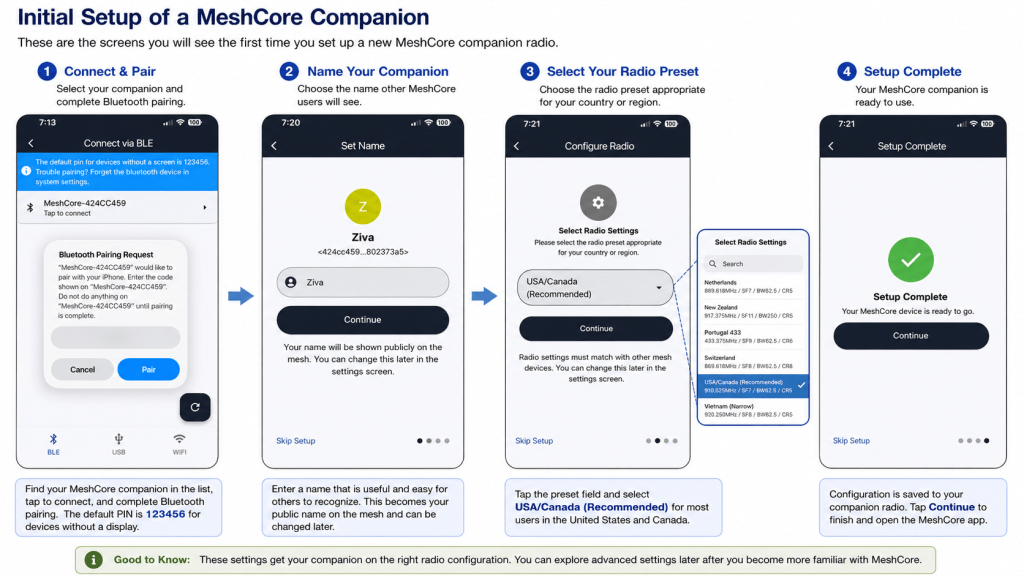
Give Your Companion a Name
During initial setup, MeshCore asks you to choose the name that other users will see for your station.
Choose something useful and reasonably easy to recognize. Depending on how you use MeshCore, that might be your first name, amateur radio callsign, nickname, or another short station name.
The displayed name helps other people recognize you, but it is not the unique identity of your MeshCore device.
MeshCore also assigns the device a Public Key, which is the unique identifier used underneath. Two devices can therefore have the same or similar displayed names and still be different MeshCore nodes.
For a new user, there is no need to memorize or manage the Public Key. Simply choose a useful name and let MeshCore handle the underlying identity.
Choose a Name Others Can Recognize
As a local mesh grows, clear names become increasingly useful. Extremely generic names can make it difficult for other users to know which station they are seeing.
A callsign may be an obvious choice for an amateur radio operator, while another user may simply choose a familiar name or nickname.
Think of the displayed name as the label people see and the Public Key as the identity MeshCore uses underneath.
Location and Privacy
MeshCore can associate location information with a device. This can be useful because knowing approximately where stations are located helps users understand the network around them and can make it easier to recognize nearby devices.
Location information, however, should be treated differently from ordinary configuration settings because it can reveal where you or your equipment are located.
Decide How Much Location Information You Want to Share
Before enabling or entering location information, consider how the companion will be used.
A fixed device installed at a known public or shared site presents a different privacy consideration from a companion that you carry with you or operate from your home.
There is no requirement that a new user provide a precise location simply to participate in MeshCore. If you are uncertain about sharing location information, it is reasonable to leave it unset until you better understand how you want to use the network.
Accuracy and Privacy Are a Tradeoff
More precise coordinates provide more accurate information about where a station is located, but they also reveal that location more precisely.
For a portable companion, consider whether broadcasting a highly accurate position provides enough benefit to justify sharing it. For a station operated from home, the same consideration applies to publishing coordinates that could identify your residence.
Do not enter a precise location simply because the option is available. Choose the level of location information appropriate for how the device will be used.
Location Does Not Define Your MeshCore Identity
Your location is additional information associated with the station; it is not what makes the device uniquely yours. Changing locations—or choosing not to provide one—does not change the device’s underlying MeshCore identity.
For someone setting up a first companion, the important point is simple:
Location can be useful, but sharing it is a choice. Consider privacy before deciding how accurately you want your position represented.

