How Messages Travel Through the Mesh
When you send a MeshCore message, the receiving station does not necessarily have to be within direct radio range of your companion.
If two stations can hear one another directly, communication can take place without another radio between them. This is the simplest case: one station transmits and the other station receives it directly.
But that is only part of what makes MeshCore useful.
Other MeshCore devices can help carry messages beyond the range of a single companion. A repeater that receives a message may forward it, allowing another repeater or the intended receiving station to hear it farther along the network.
A message might therefore travel like this:
Your Companion → Repeater → Another Repeater → Receiving Station
Each time a message is carried from one MeshCore device to another along such a route, you will often hear the term hopused to describe that step through the mesh.
Your Radio Range Is Not the Same as Your Mesh Range
This distinction is important.
Suppose your companion can communicate directly with a repeater several miles away. That repeater may be able to reach another repeater many miles beyond you, and that repeater may reach still another part of the network.
A station reached through that chain could be far outside the direct radio range of your companion.
That does not mean your companion transmitted all the way to the distant station. The mesh helped carry the message there.
This is why MeshCore coverage can extend well beyond what you might expect from a small portable LoRa radio by itself.
Not Every Message Travels the Same Way
MeshCore has more than one way of moving information through the network.
Messages sent to a shared channel such as Public can be forwarded through the mesh so that the conversation can reach users beyond those who hear the original transmission directly.
A Direct Message is different. It is intended for a particular station, and MeshCore can use routing information to help move that message toward its destination.
For now, you do not need to understand the routing mechanisms or configure them yourself.
What matters is the basic idea:
Some stations you communicate with are within direct radio range. Others are reachable because the MeshCore network between you helps carry the message.

Direct vs. Flooded Messages
Not every MeshCore message travels through the network in the same way.
Two important methods you will encounter are direct routing and flood routing. Understanding the difference will help explain why some messages follow a particular path while others may be heard across a much larger portion of the mesh.
Direct Messages Follow a Path
When you send a direct message to another station, MeshCore can use a known path through one or more repeaters to reach that station.
For example, a message might travel:
Your Companion → Repeater A → Repeater B → Other Companion
In this example, Repeater A and Repeater B are the two hops in the path. If the two companions can communicate with each other without a repeater, the communication is Direct rather than a one-hop path.
Using a known path allows the message to be carried toward its intended destination without requiring every repeater in the surrounding network to retransmit it.
A direct message is intended for one destination. The network can use a specific route to get it there.
Flooded Messages Spread Through the Mesh
Flood routing works differently.
Instead of following one predetermined path toward a particular station, a flooded message can be retransmitted by repeaters that receive it and are permitted to forward it.
Those retransmissions allow the message to propagate outward through the mesh:
Companion → Repeater A → Repeater B → Repeater C → …
Other repeaters may receive the same message and carry it in additional directions. MeshCore includes mechanisms to recognize packets it has already handled so that the same transmission does not simply circulate indefinitely.
This makes flooding useful when information needs to reach multiple stations and no single destination path is being followed.
Why the Difference Matters
Direct routing and flood routing place different demands on the network.
A routed direct message can make efficient use of a known path between two stations. Flooding can distribute information much more broadly, but every retransmission consumes airtime.
On a small mesh, that distinction may not seem important. As a network becomes larger and busier, however, unnecessary flooding can contribute significantly to network traffic.
Direct routing moves a message toward a particular destination. Flood routing allows a message to spread through the mesh.
For now, you do not need to configure or optimize either method. The important thing is to recognize that not every message you see in MeshCore is being transported in the same way.

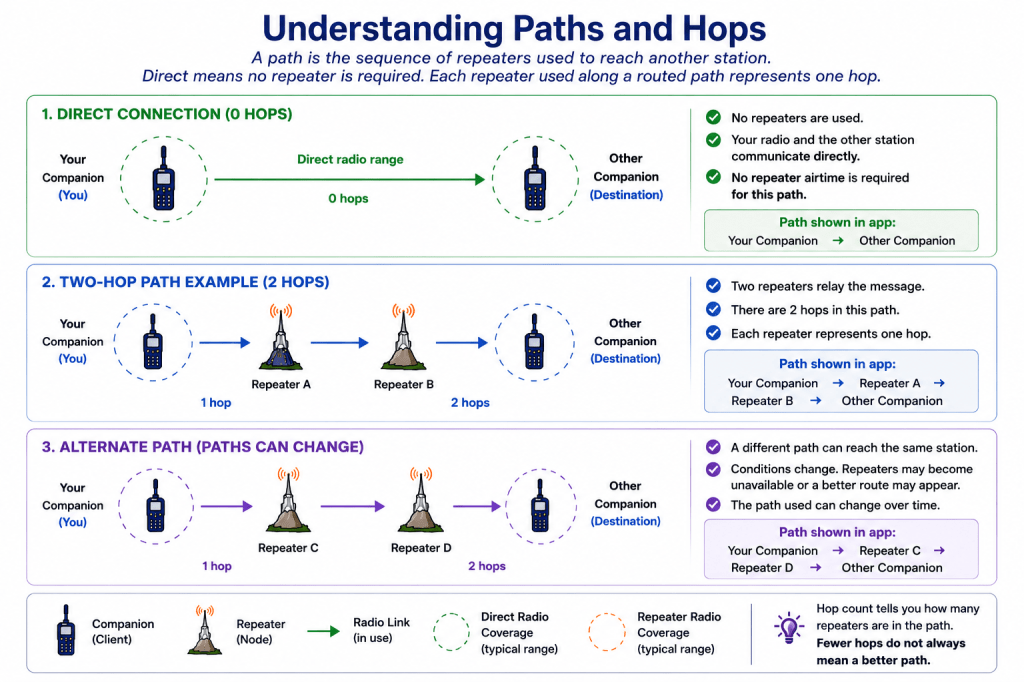
Understanding Paths and Hops
When MeshCore communicates with a particular station, the message may need to pass through one or more repeaters before reaching its destination.
The sequence of repeaters used to reach that station is called a path.
For example:
Your Companion → Repeater A → Repeater B → Other Companion
In this example, the path contains two hops because two repeaters relay the message.
If your companion can communicate with the other station without using a repeater, MeshCore identifies that connection as Direct.
Direct means no repeater is required. Each repeater used along a routed path represents one hop.
Paths Are Learned
You normally do not need to determine every route through the network yourself.
As MeshCore devices communicate, information about available routes can become known to your companion. This allows MeshCore to use a path that has previously been discovered when communicating with another station.
A station that is beyond your direct radio range may therefore still be reachable through repeaters elsewhere on the mesh.
This is one of the fundamental advantages of a mesh network: your companion does not need to hear the destination directly if other MeshCore devices can provide a route between you.
Paths Can Change
A path should not be thought of as a permanent route.
Radio conditions change. A repeater may become unavailable, a portable station may move, or another route through the network may become available.
Because of this, the path used to reach the same station can change over time.
You might reach a station through two repeaters at one time and later reach it directly or through a different combination of repeaters.
A path describes how the network can reach a station—it does not mean that route will always remain the same.
Fewer Hops Are Not the Whole Story
It may seem natural to assume that the path with the fewest repeaters must always be the best path.
Radio networks are more complicated than that.
A short path containing a weak or unreliable radio link may perform worse than a somewhat longer path made up of strong, dependable links.
For the new MeshCore user, the important point is simply this:
Hop count tells you how many repeaters are involved in the route. It does not, by itself, tell you how good that route is.
Later in the MeshCore Learning Series, we can examine path selection, signal quality, repeater placement, and routing behavior in considerably more detail.
Paths Can Change
A path is not necessarily permanent.
Repeaters may become unavailable, radio conditions may change, or another route may become available. A station that was previously reached through several repeaters might later be reached through a different combination of repeaters—or even directly.
This is one of the important characteristics of a mesh network: the route between two stations does not have to remain the same.
What You Need to Know for Now
At this stage, you do not need to manage individual repeaters or understand the detailed routing mechanisms behind every message.
The important concepts are:
- Direct means the destination was reached without a repeater.
- A path identifies the repeaters used to reach another station.
- Each repeater in that routed path represents one hop.
- Paths can change as the network and radio conditions change.
Later, when we examine routing and network operation in greater detail, we will look more closely at how paths are discovered, selected, and maintained.
For now, think of a path simply as the route your message takes through the mesh to reach another station.
Seeing Path Information in the MeshCore App
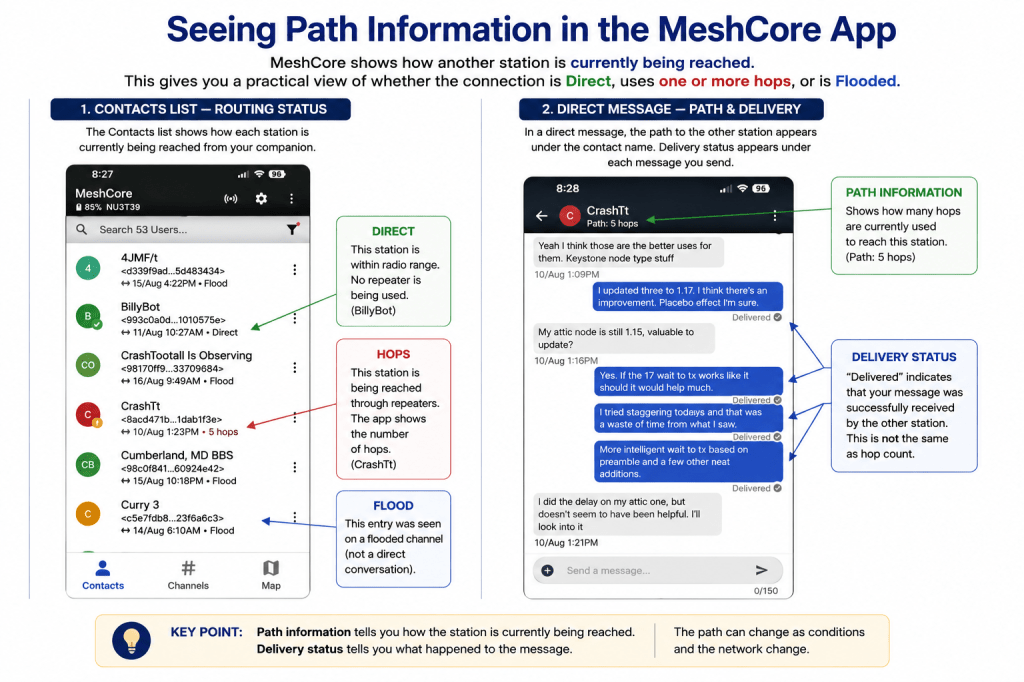
When MeshCore has information about how another station can be reached, the app may display path information associated with that station or conversation.
This gives you a practical view of something we have just discussed conceptually: whether another station is being reached directly or through one or more repeaters.
A station reached without a repeater may be identified as Direct. When repeaters are involved, the app may instead indicate the number of hops or provide additional path information.
For example:
Direct — No repeater is being used between your companion and the other station.
1 hop — One repeater is being used.
2 hops — Two repeaters are being used.
The path information you see should be considered a picture of what your companion currently knows about reaching that station. It does not mean that the route can never change.
As conditions and the network change, MeshCore may learn another way to reach the same destination.
Don’t Worry About Choosing Paths Yet
For your first conversations, you generally do not need to decide which repeaters should carry a message.
At this point, simply begin noticing the path information shown by the app. It provides a useful window into how your messages are traveling through the network.
As you use MeshCore, Direct and hop information will begin to show you something your phone normally hides—the radio network actually carrying your conversation.
Continue to: Sending and Receiving Your First MeshCore Messages→
 MeshCore Learning